
Something big has shifted over the past couple of years, and it touches every website we’ve built for you, especially the ones that have been running for five, eight, or ten-plus years.
Recently, AI has changed three things that affect pretty much every website we manage: how people find you online, how attackers try to break into sites, and new tools that help us catch and fix accessibility issues. None of this means your site is broken. It means the internet it was built for has moved on, and it’s worth taking an honest look at where your site stands today.
We lean on a few specific tools to help clients navigate this: SEOPress Pro for search visibility, Melapress WP 2FA for login security, and Equalize Digital’s Accessibility Checker for making sure real people, of all abilities, can actually use your site. Here’s the plain-language version of why each one matters right now.
1. How People Find You Has Changed (and Your Site May Not Be Set Up for it)
For years, the goal of a website was simple: rank high enough in Google that someone clicks your link. That’s still worth doing, but it’s no longer the whole picture.
Google now answers a huge number of searches directly on the results page, using AI Overviews, before anyone clicks anything. Industry research from SparkToro, using Datos clickstream data, found that 58.5% of U.S. Google searches end without a single click to any website. When an AI Overview appears, that number climbs even higher, and Pew Research found that people click through to a source cited in an AI Overview only about 1% of the time. The answer satisfies them right there, and the site that provided it often never gets the visit.
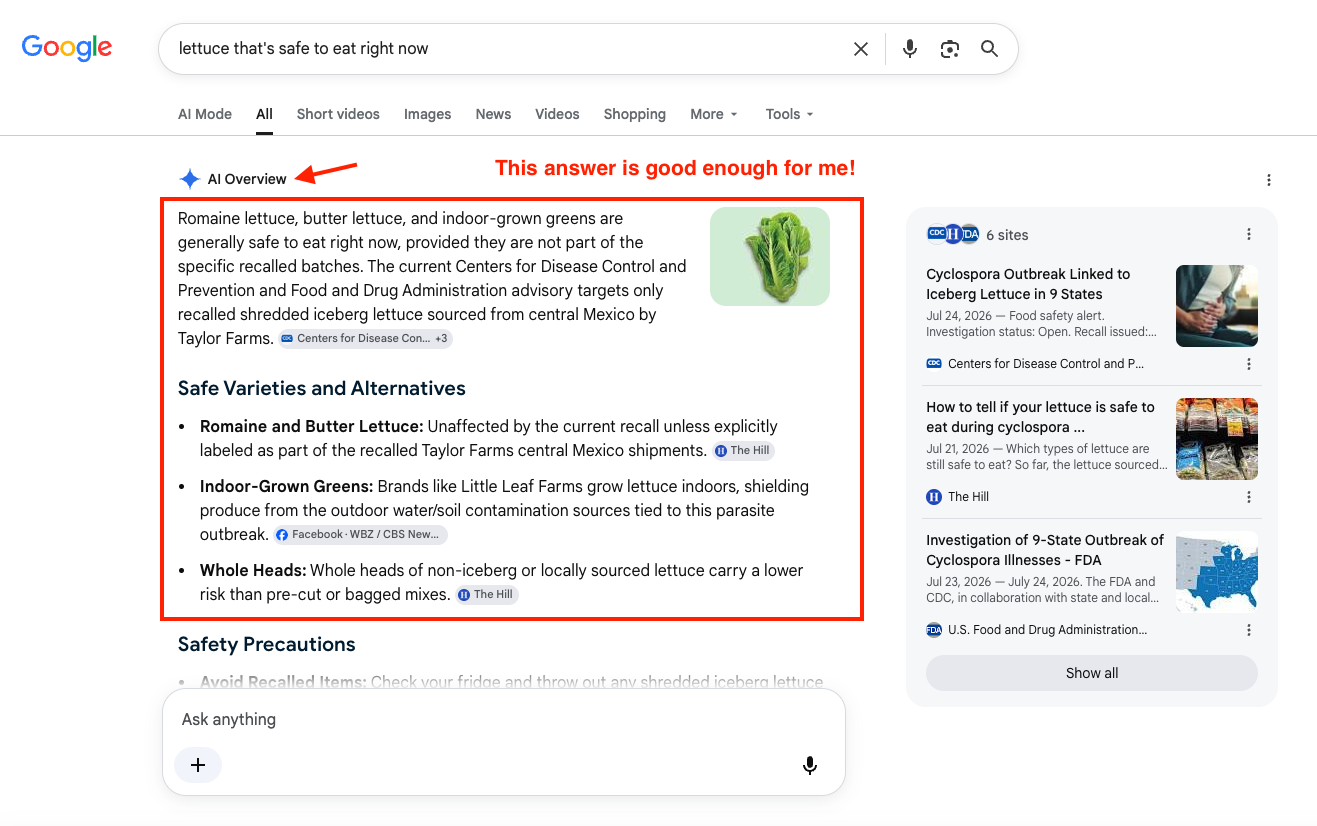
In this example, prominent websites like the CDC and USFDA are most likely not being visited.
This is where Generative Engine Optimization, or GEO, comes in. Traditional SEO tries to earn you a spot in a list of links. GEO tries to get your business mentioned or cited inside the answer itself, even when nobody clicks through. It’s a different goal, and it depends on a different kind of groundwork.
AI tools lean heavily on something called structured data, also known as schema markup. This is behind-the-scenes code that spells out, in a format machines can read, exactly what a page is about: this is a local business, here are the hours, here is the address, this is a product, here is the price, this is a question and here is its answer. Without it, an AI system has to guess what your page means, and it tends to favor sites that hand it clean, labeled information over ones it has to interpret.
Here’s the part that matters most for older sites: most WordPress themes built more than a few years ago either skip structured data entirely or add a thin, generic version that doesn’t say much. That’s not a knock on the original build. It simply wasn’t a priority when the theme was made. It is now.
This is why Biscuit has been retrofitting our existing clients’ websites with SEOPress Pro. It’s a WordPress plugin that handles a lot of this housekeeping in one place:
- Generates proper schema markup automatically (Local Business, Article, FAQ, Product, and more), so AI tools and search engines can actually understand your pages
- Runs a full site audit that flags technical problems across your content
- Checks for broken links and monitors 404 errors, so visitors and AI crawlers alike aren’t hitting dead ends
- Helps clean up redirects and duplicate content that can confuse search engines
None of this guarantees you’ll show up inside every AI answer. Nobody can promise that. But it gives your site a fair shot at being understood by the tools that are increasingly standing between you and your customers.
2. AI Has Made Website Attacks Faster and Smarter
WordPress runs a huge percentage of the world’s websites, which makes it a constant target. The numbers from the past year are sobering. Security firm Patchstack recorded 11,332 new WordPress vulnerabilities in 2025, the highest count on record and a 42% increase over 2024, at 7,966 a number that felt alarming at the time. The median time between a vulnerability being disclosed and someone actively exploiting it is now about five hours. By the time a fix is announced, bots are often already testing sites for the gap.
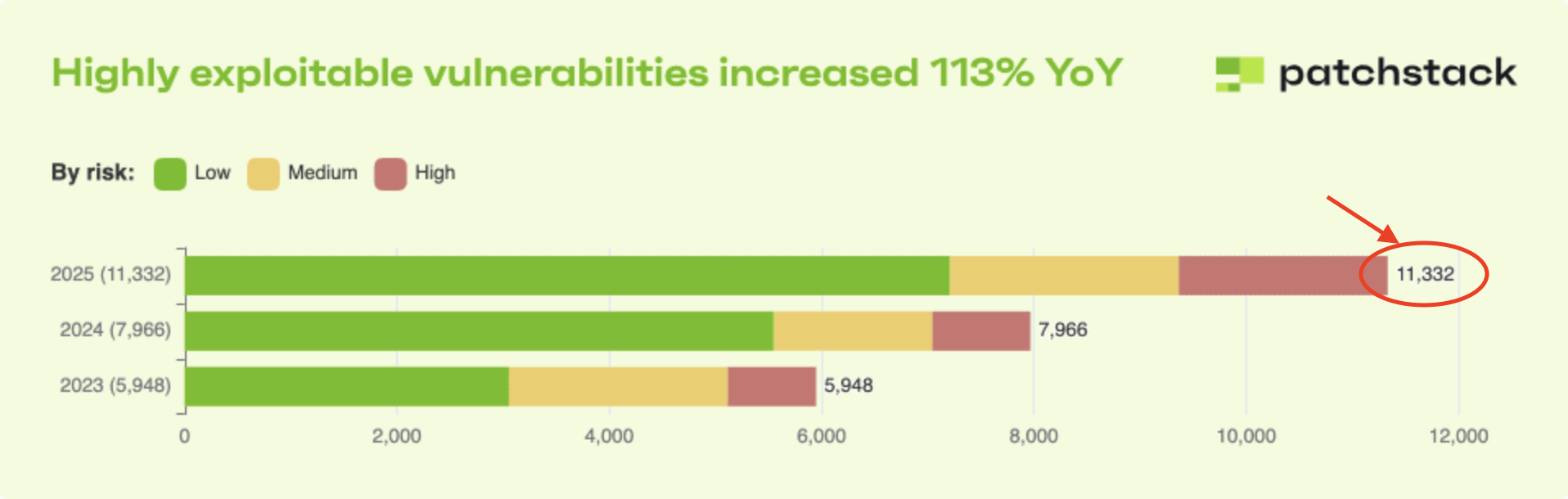
Image from Patchstack showing increase in vulnerability since 2023.
Credential stuffing, where attackers try stolen username and password combinations from other data breaches against your login page, remains the single most common way WordPress sites get broken into, according to Wordfence’s threat intelligence data. This isn’t a person sitting at a keyboard guessing passwords. It’s automated, constant, and running around the clock against login pages everywhere, including yours.
AI has made this worse in a specific way. Attack tools can now adapt in real time, adjusting their behavior to slip past CAPTCHAs and login attempt limits the same way a person might. In the past, these kinds of breaches were reserved for skilled hackers, but with AI literally anyone can do it, and there are billions of stolen credential pairs circulating for attackers to try.
If your site runs WooCommerce, the stakes are even higher. You’re not just protecting a login. You’re protecting customer names, addresses, and order history. A single compromised admin account can expose all of it.
This is where two-factor authentication, or 2FA, earns its keep. In plain terms, 2FA means a password alone isn’t enough to log in. After entering the password, you also have to confirm it’s really you, usually with a code from an app on your phone. Even if an attacker has a stolen password, and given how many are floating around, they might, that second step stops them cold.
Biscuit uses Melapress WP 2FA to add this layer directly to your WordPress login, for both site admins and, if you sell online, customer accounts. It’s a small addition that closes off the most common way sites like yours actually get breached.
3. AI is Making it Faster to Find and Fix Accessibility Problems
Web accessibility is still falling short, and the scale of the problem is bigger than most site owners realize. Every year, WebAIM scans the home pages of the top one million websites and checks them against WCAG, the Web Content Accessibility Guidelines that define what an accessible website looks like. The 2026 report found that 95.9% of home pages have at least one detectable WCAG failure, with an average of 56 errors per page.
The most common problems are almost boring in how basic they are, and they’ve topped the list for seven years straight:
- Low color contrast. Light gray text on a white background looks clean but is genuinely hard to read, especially for people with low vision or anyone outdoors in bright sun. WebAIM found it on 83.9% of home pages.
- Missing alt text. Images without a text description are invisible to anyone using a screen reader, and this affects more than half of all pages scanned.
- Poor heading structure. Screen reader users often navigate a page by jumping between headings. When headings are used for visual styling instead of real structure, that navigation breaks.
- No keyboard navigation. Some visitors can’t use a mouse. If your menus, forms, and buttons can’t be reached with the Tab key, large parts of your site are simply off limits to them.
These aren’t obscure edge cases. They’re small, repeated mistakes baked into a theme years ago, and once they’re in the theme, they show up on every single page it powers.
Here’s where AI actually helps. Automated scanning tools can now check an entire site against current WCAG guidelines and flag exactly where the problems live, work that used to take a specialist days to do by hand, one page at a time. That speed matters, because the fixes are only useful if you know where to point them.
Beyond the legal risk, which is real and growing, here’s why this deserves real attention. According to the CDC, more than 1 in 4 adults in the United States, over 70 million people, report living with a disability. When your site excludes them, you’re not managing a compliance checkbox. You’re turning away real people who wanted to read your page, book your service, or buy something from you, and simply couldn’t. Globally, people with disabilities control more than $8 trillion in discretionary spending. That’s not a niche audience.
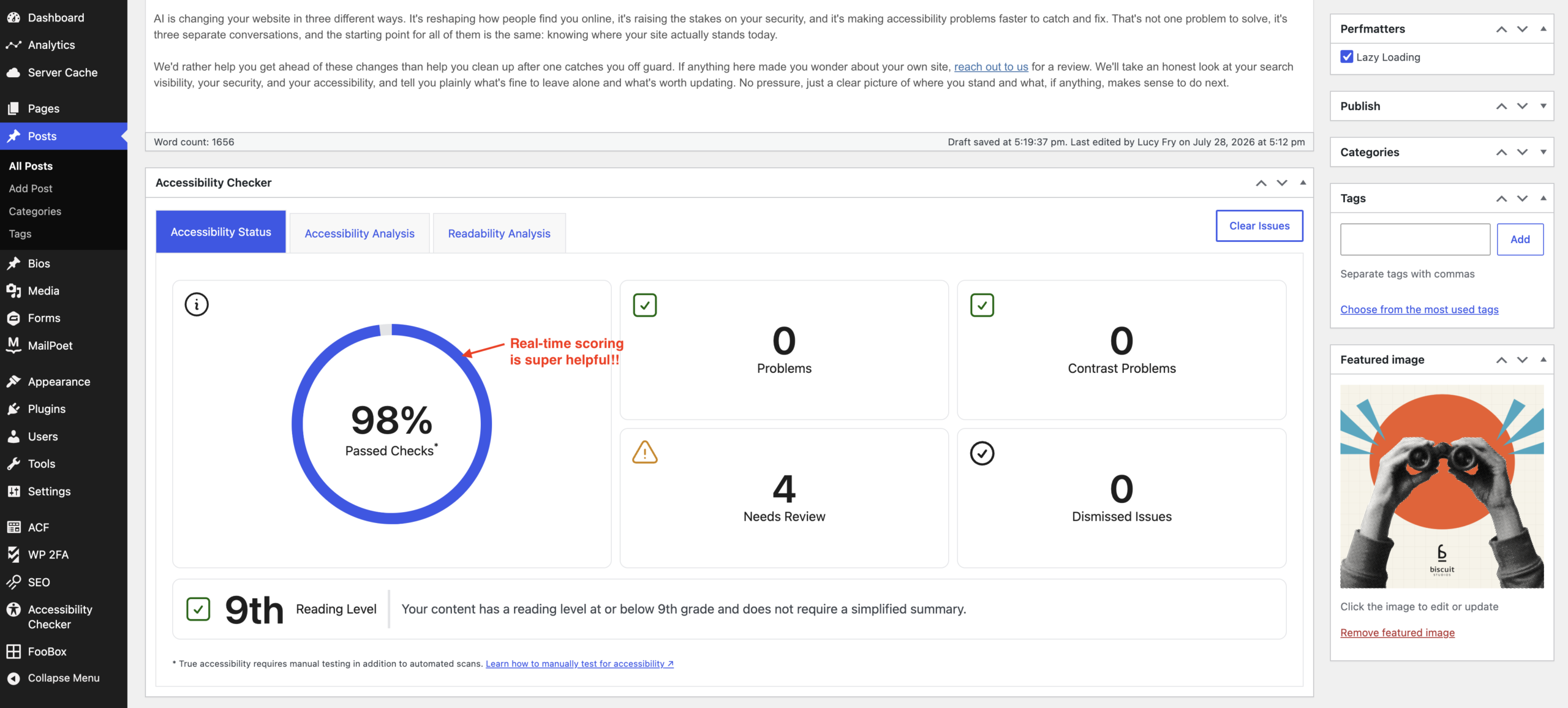
WordPress backend showing how this blog post scores on accessibility.
At Biscuit, we are using Equalize Digital’s Accessibility Checker, a plugin that scans your pages right inside the WordPress editor and runs more than 45 automated checks against current WCAG 2.2 guidelines the moment you save or publish. It’s trusted by organizations, including NASA’s website team, and all scanning happens on your own server rather than sending your content to an outside service. One honest caveat, straight from Equalize Digital themselves: no automated tool catches everything. Real accessibility takes a mix of automated scanning, human review, and follow-through on what gets found. The tool gets you most of the way there, fast, and shows you exactly what’s left for a person to check.
Where This Leaves You
AI is changing your website in three different ways. It’s reshaping how people find you online, it’s raising the stakes on your security, and it’s making accessibility problems faster to catch and fix. That’s not one problem to solve, it’s three separate conversations, and the starting point for all of them is the same: knowing where your site actually stands today.
We’d rather help you get ahead of these changes than help you clean up after one catches you off guard. If anything here made you wonder about your own site, reach out to us for a review. We’ll take an honest look at your search visibility, your security, and your accessibility, and tell you plainly what’s fine to leave alone and what’s worth updating. No pressure, just a clear picture of where you stand and what, if anything, makes sense to do next.

Lucy Fry
Lucy is the heart of Biscuit. Born and raised in Miami Florida, Lucy grew up surrounded by color, culture, loud music, crazy foods and the kind of heat that terrifies most. But she loved every second of it. It created a fire inside that seamlessly translates into her work, her relationships with clients and her belief that great things come from happy people.


